
Metamation Developer Notes

  • Developer Notes
  • Resource Map
  • Tools
    • Code Formatting
    • Configuring Git
    • Assignments
    • Testing with Windows Sandbox
    • Single Binary Applications
    • Self-Updating Applications
  • Flux Workflow
    • Flux Workflow
    • Flux Development Style Guide
    • Release notes for Flux
    • SonarCloud analysis for Flux
    • Build a Flux SDK Program
    • Shipping Flux
    • Flux.Test
      • BasicBendAuto Test
      • LaserAuto.cs Detailed Documentation
      • Laserexample:Test1
  • Technical Notes
    • File formats
      • .FX File Format
      • Au(Gold) streams
      • .GEO File Format
      • .LST File Format
      • .LST file - technology
      • .BNC File Format
      • .WAD Files: Flux Resource Packages
      • .Curl Files: ASCII config information
    • Folders App
      • Data\Bendtools
      • Data\Machines
    • FluxCode
      • Welcome & Repo Map
      • Architecture & System Context
      • Subsystem *Bend* (Press Brake)
      • Subsystem *BCell* (Bend Cell Automation)
      • API Maps
      • Data Model Catalog
      • Design Patterns -- A Reader's Guide
      • Tests and Golden Paths
      • Guided Code Tours
      • CAM Glossary with Code Mapping
      • Assignments
      • Flux Onboarding Handbook
    • Data flow
      • Part
        • Part.Dwg
        • Part.Load
        • Part.Load to Part.Dwg
      • BendTech.cs
      • Bend Technology
      • Laser Cutting Technology
    • Machine ID Scheme
  • FluxTester
    • LaserTooling.cs Test Steps
    • Fluxtester Recipe Book
    • Nesting.cs Overview
    • Nesting.cs Recipe Book
    • Job.cs Overview
    • Job.cs Recipe Book
  • 3d party software
    • Python
  • Documentation
    • Bento tool
      • Structure
      • Attributes
    • Software
      • Software Requirement
      • Installation
      • Git Workflow
      • Environment Variable
      • Tools
    • Workflow
      • Roles
      • Analyze
      • Edit
      • Proofread
      • Pre-Publish
      • Publish
      • Release cycle
      • Information required for Documentation Team
      • Checklist for Documenters
    • Styleguide
    • Flavoring
    • Translation
      • General process
      • Anchor points
      • BT Diff Generation
      • BT Translate
      • BT Apply Changes
      • Order at Seprotec
    • Citations
Documentation
/
Translation
/
BT Translate

BT Translate

The next step is to translate the .sew file. The .sew file from the target repository can be opened in any text editor (notepad, notepad++, word etc.).
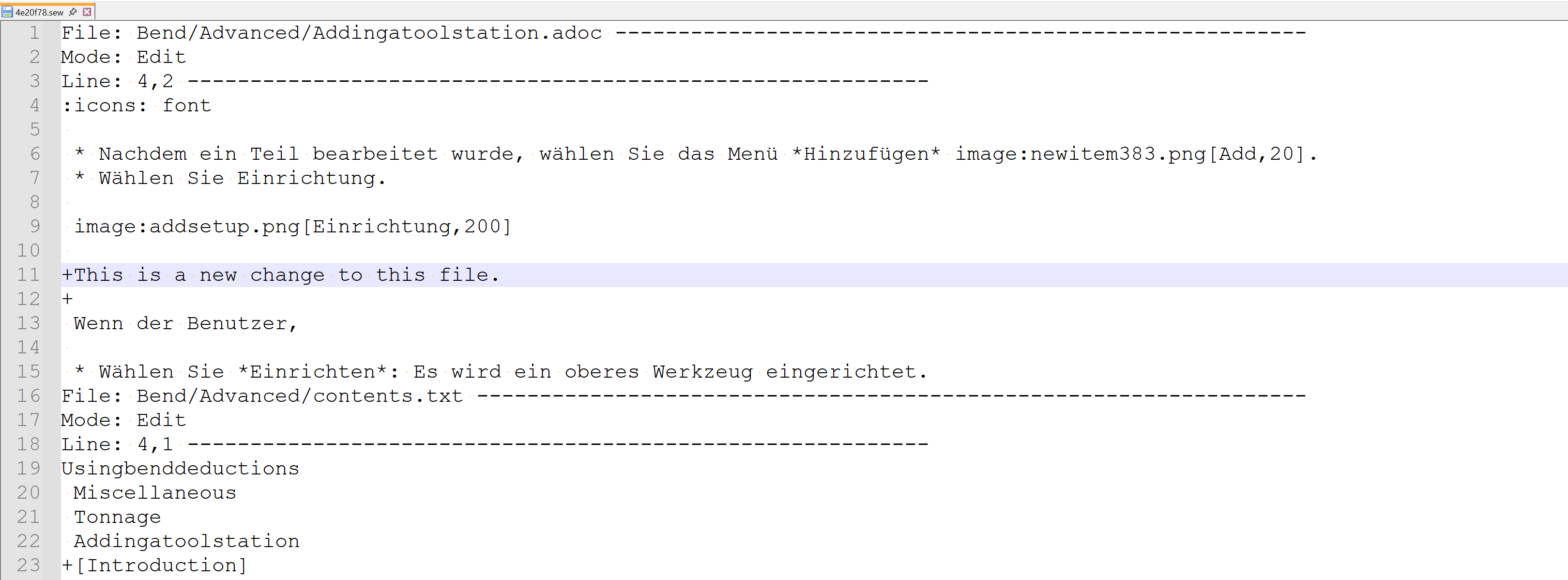
image6

File Structure: and commands

File = file path (Where is the file relative to the current folder?)
Mode = Edit | NewFile | Delete | Rename (What kind of changes were made?)
Line = StartLine (Where in the file is this change located?)
Lines = Number of lines (How many lines does a new file have?)
Below a newly added file is shown (Mode = New). It has 433 lines in total that have been added:
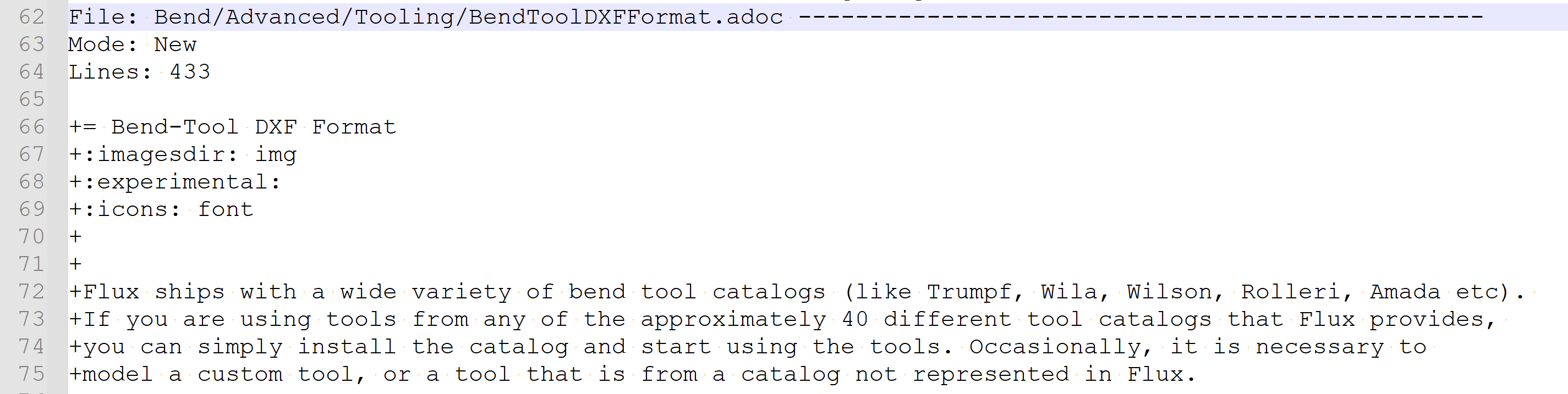
image7

Files in Delete and Rename modes do not contain any information except that they were deleted/renamed.


image8

image9

The changes are marked by a '+' or '-' sign to indicate if a line was added, removed, or changed.

Edits should ONLY be made in the lines starting with '+'.

Line added:

image6

Line Edited:

'-' sign indicates the previous version of the line. '' sign indicates the new/changes version of the line. In this case, the changed version from the English document is sewn into the German document. *Only the line starting with '' must be changed.*

image10

Any lines that have only been removed should not be edited.

image11

A single File can have multiple "Line" sub-sections, one for each change made, but only one parent mode. For example: The following file has two changes made in two different places. Instead of writing the whole change along with context, it has been split into 2:
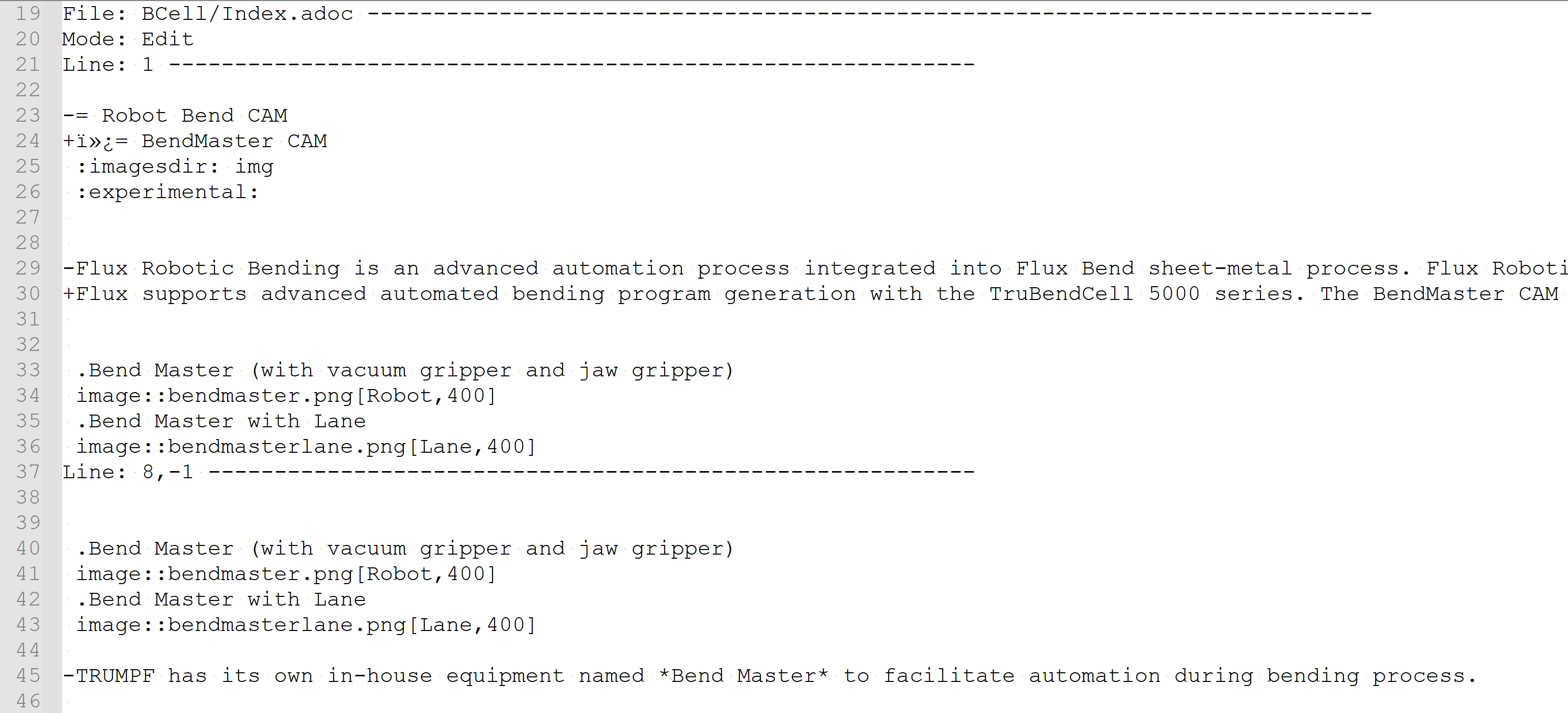
image12

Renaming and then editing a file would require two entries like so:
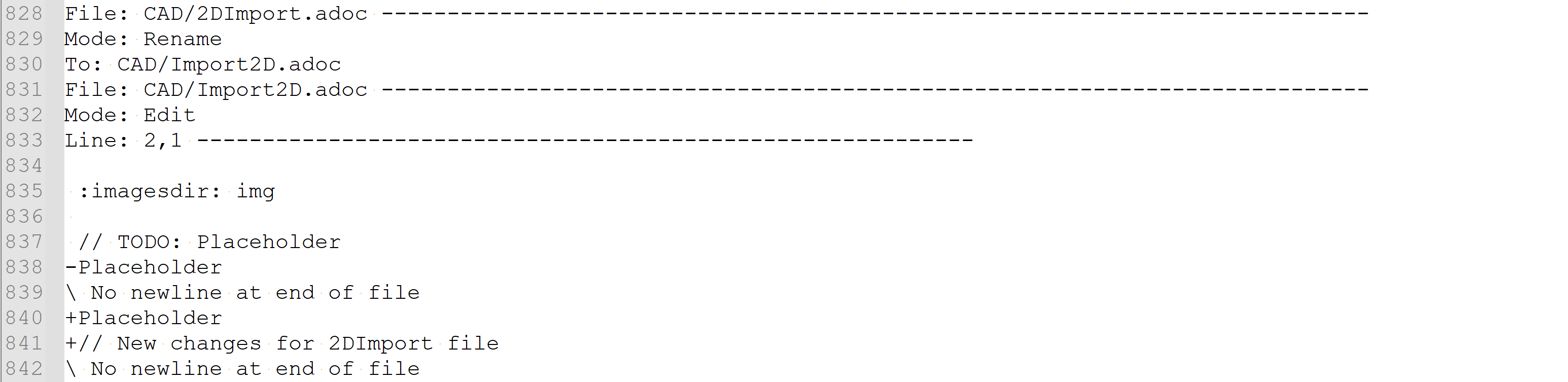
image13

Contents

  • Line added:
  • Line Edited:
BT Diff Generation BT Apply Changes

      Copyright © 2025 TRUMPF Metamation. All rights reserved.

    Compiled by Bento