
Build a Flux SDK Program
Overview
This document explains to users about how to use Flux API binaries in an application to implement the API functionalities.
Locate API Resources
Default location: C:/FluxSDK

Note: If the SDK is not installed in the default path, then obtain the installed location.
API Binaries: Flux SDK installed path / Bin
API Reference: Documentation
API sample programs: Flux SDK installed path / Samples
License
Contact support@metamation.com to get license key.
Steps to build a Flux SDK program
Below steps provide information about how to write a simple Flux API console application.
Step 1: Create a .Net Core application using Microsoft Visual Studio
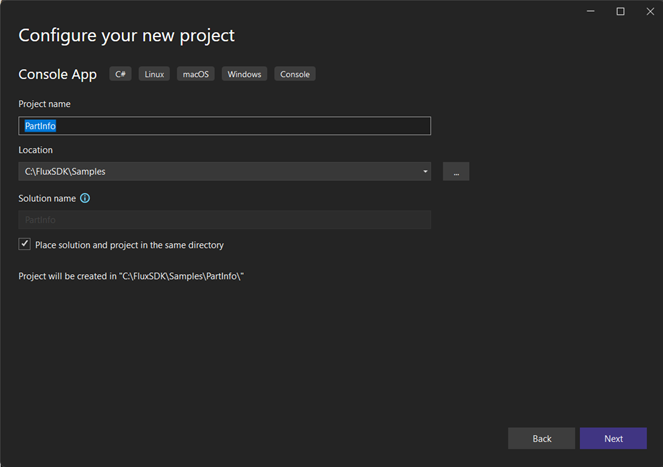
Create a .net console application in a desired path.
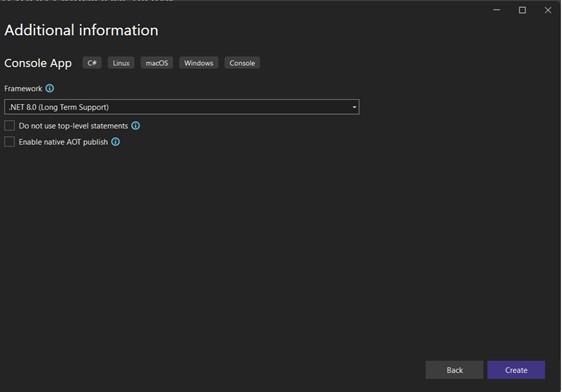
On the next page choose the framework and create the project.
Step 2: After successfully creating project, modify the .csproj(csproject) file to add properties to comply with Flux API architecture
Below commands should go under <PropertyGroup> in the project file.
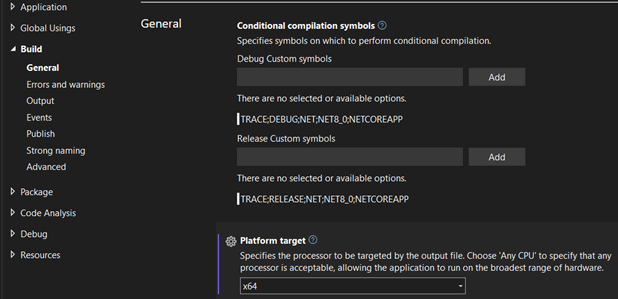
Target the platform to x64 (Console & WPF projects)
<PlatformTarget>x64</PlatformTarget>Another way to change the target platform is right click the project from Solution Explorer and select Properties, and modify the target platform under Build > General tab.
Important: For console application, add the below property elements to <PropertyGroup> in the project file.
<TargetFramework>net8.0-windows</TargetFramework>
<UseWPF>true</UseWPF>
Step 3: Move the API binaries to the application bin folder
Copy all the binaries and files from Flux SDK installed path / Bin folder (e.g., C:/FluxSDK/Bin) to the project bin folder (e.g., C:/FluxSDK/Samples/PartInfo/bin/Release/net8.0).
OR
Target the application output directory to Flux SDK installed path / Bin in .csproj file.
<Project Sdk="Microsoft.NET.Sdk">
   <PropertyGroup>
      ....
      <OutDir>C:/FluxSDK/Bin</OutDir>
   </PropertyGroup>
</Project>
Step 4: Include Flux.API.dll reference in the project
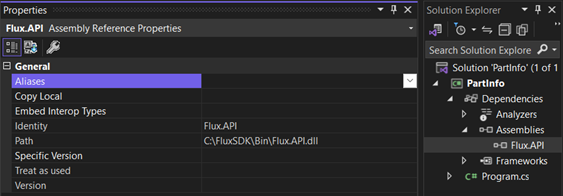
OR
Add the Flux.API.dll reference in the .csproj file.
<Project Sdk="Microsoft.NET.Sdk">
   <ItemGroup>
     <Reference Include="Flux.API">
        <HintPath>C:/FluxSDK/Bin/Flux.API.dll</HintPath>
     </Reference>
   </ItemGroup>
</Project>
Step 5: Add Flux.API assembly reference in the program file
using Flux.API;
class Program {
    static void Main (string args[]) {

    }
}
Step 6: Initialize Flux API in the program
using Flux.API;
class Program {
   static void Main (string[] args) {
      // Initialize library
      // Init method accepts three parameters.
      // param 1: Flux data directory (e.g. SDK installed path / Data)
      // param 2: Flux SDK bin directory (e.g. SDK installed path / Bin)
      // param 3: Window object (set null for console apps)
      Library.Init ("C:/FluxSDK/Data", "C:/FluxSDK/Bin", null);
   }
}
Step 7: Implement logics and run the application
Example: Implement some logic to print part information
using Flux.API;
using System.IO;
class Program {
   static void Main (string[] args) {
      if (args.Length == 0)
         Console.WriteLine ("Provide a valid geo file path as an argument");
      var file = args[0];
      if (!File.Exists (file)) Console.WriteLine ("Invalid file");
      // Initialize library
      Library.Init ("C:/FluxSDK/Data", "C:/FluxSDK/Bin", null);
      Console.WriteLine ("Flux build {0}", Sys.FluxBuild);
      var part = Part.Load (file);
      Console.WriteLine ($"Name: {part.Info.Name}");
      Console.WriteLine ($"Author: {part.Info.Author}");
      foreach (var pair in part.Info.Dict)
         Console.WriteLine ($"{pair.Key}: {pair.Value}");
   }
}
Execute program: Build the project and execute the program in command prompt
C:\FluxSDK\Bin>PartInfo.exe C:/etc/060030.sldprtOutput:
Flux build 522
Name: 060030
Author: vignesh
SrcSystem: Slw
Component Type: 0
HMOTNOST: 1155.61
MATERIAL: 1.4016
NAZEV: CELO ZASUVKY GN1/2 <SCHGN>
SW-HasDesignTable: 0
SW-Long Date: 18. prosince 2015
SW-MassProp-Config-0: 0.059877, 0.007752, 0.207499, 0.000148, 0.372030, 1.155611, 0.021033, 0.033245, 0.012511, -0.000246, -0.000000, -0.000000, 1.000000, 0.000000
SW-MassProp-Config-3: 0.059772, -0.000400, 0.207500, 0.000148, 0.370623, 1.151364, 0.022145, 0.035843, 0.013698, -0.000000, -0.000000, -0.000000, 1.000000, 0.000000
SW-Naposledy Ulozen Kym(Last Saved By): Spicák
SW-Název konfigurace(Configuration Name): Default
SW-Short Date: 18.12.2015
SW-datum tvorby(Created Date): 14. srpna 2006 7:03:10
SW-naposledy ulozen(Last Saved Date): 18. prosince 2015 7:34:52
SW-název slozky(Folder Name): F:\doslá posta\PLOCHA\208604_CELO_GN_1_2_710\
SW-název souboru(File Name): 060030
TLOUSTKA: 0.8
UNIT_OF_MEASURE: - zádné -
SHEETMETAL_PARAMETERS: 0.32
Register product license
Note: Execution of the program might launch NoLicense API exception if Flux license for SDK is not registered already.
API to register product
Console application
// Register license (non user interface method for console apps).
Library.RegisterLicense (serial, user, email);
Windows application
// Register license (user interface method for windows apps).
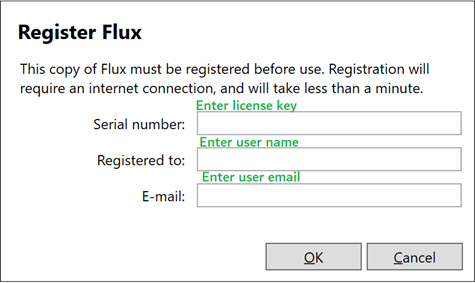
Library.RegisterLicenseUI ();
Windows application license prompt
Note: Request TMM support for license.