
Data\Bendtools
This document explains the layout of the Flux Data folder. This folder contains two kinds of data: immutable, read-only data, and data that is modified as Flux runs. Here we look at the various sub-folders inside the Data folder, and how common operations like installing machines and bend-tool catalogs are carried out.
Bend tool catalogs
Flux ships with a few dozen bend-tool catalogs, mostly mapped to actual catalogs published by various manufacturers. Some are machine manufacturers like Trumpf or Amada, while others are specialist companies that only make bend tools, such as Wila or Rolleri.
Like a lot of data in Flux, the representation of bend tools on developer machines is different from the representation in customer Flux installations. On developer machines, there is usually an unpacked version that is friendlier for editing and revision control, so text files are preferred over binary.
On end-user installations, compact representation is more important, so the data is usually zipped. This also prevents casual inspection or inadvertent editing by end-users.
On developer machines
On developer machines, each bend-tool catalog is stored in a sub-folder under Data/Archive/BendTools, and these folders are named by catalog ID.
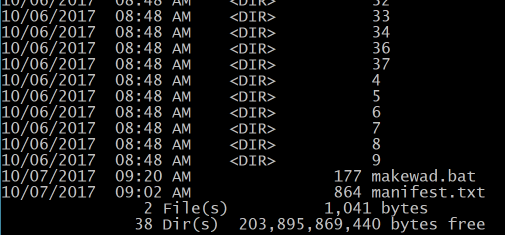
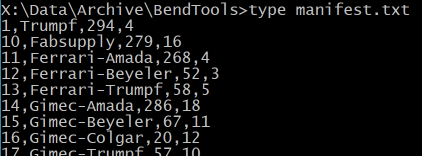
Within each numbered folder there is a single BendTools.curl file that contains one BToolLibrary object. In addition to the individual catalogs, there is a manifest.txt file in the root folder.
This manifest lists the catalog name, tool count, and revision number, and is used to quickly populate the Bend Tool Catalog editor without loading all BToolLibrary objects.
In Flux installations
The entire BendTools folder is zipped into a single BendTools.wad file, which includes manifest.txt. This is the only file installed, and it is in the Bin folder alongside Flux.exe.
Installing a bend-tool catalog
The Data/Archive/BendTools folder, or BendTools.wad, contains many bend-tool catalogs. However, only a few are usually installed in a customer installation. Flux ships with only the Trumpf catalog installed by default, but users can install additional catalogs, or uninstall installed ones, using the Database icon.
Installed catalogs are stored in Data/BendTools, with one sub-folder per installed catalog, named by catalog ID. Within that folder, Flux does not copy BendTools.curl from the wad because that would duplicate immutable data. Instead, it places a marker.
This marker indicates that Bend Tools catalog 1 is installed. The actual data is always fetched from the archive, Data/Archive/BendTools on developer machines and BendTools.wad on customer installations. So installing a bend-tool catalog is as simple as creating a sub-folder in Data/BendTools and placing marker.bin in it.
A sub-folder is still needed because users often modify the inventory of the catalog, specifying actual punches and dies they own and segmentation quantities. This information is stored there in inventory.curl, which is read-write, unlike BendTools.curl.
Machines
Machine data is stored analogously. On developer machines, each potential machine is stored in a sub-folder of Data/Archive/Machines, and that sub-folder has the machine ID as its name. On customer installations, the entire set of machines is packed into a single Machines.wad file stored alongside Flux.exe.
When a machine is installed, Flux creates a folder with the machine ID inside Data/Machine and places marker.bin there. Other files are added over time in that same folder. For example, if the user edits machine settings, settings.curl is created there. If the user edits available options for that machine, like bend-guard or support-table options, those are stored in files such as options.ini. The actual machine data is still always fetched from Data/Archive/Machines or Machines.wad, so there is no data duplication.
The redirect.map file
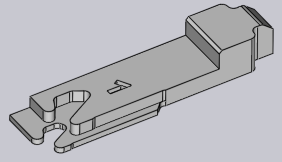
There are over 200 machines in Flux, and more are added over time. Across machine models there is substantial duplicated data. For example, BG1.Mesh is the 3D model of the left back-gauge for most Trumpf 6-axis machines. The same file appears in many machine model folders. Similar duplication exists throughout Data/Archive/Machines.
A redirection mechanism removes these duplicates. It is invoked with this command:
flux.console streamlinewad x:\data\archive\machines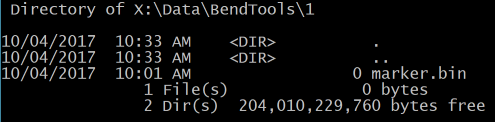
This analyzes all files in the specified location, finds duplicates, deletes duplicate copies, and creates a redirection map stored in the root folder as redirect.map. Example entries:
120021/settings.curl | 120000/settings.curl
120021/Model/Beam.mesh | 120020/Model/Beam.mesh
120021/Model/BedCrash.dxf | 120010/Model/BedCrash.dxf
120021/Model/BendAidCarriage.geo | 120000/Model/BendAidCarriage.geo
120021/Model/BG.geo | 120000/Model/BG.geo
The first line means that if 120021/settings.curl is requested, 120000/settings.curl should be used instead because both are identical. After this entry is created, 120021/settings.curl is deleted.
At runtime, redirection is automatic because all file access goes through the IStmLocator interface. Any time Flux opens configuration or database files, it uses FX.OpenRead or FX.OpenWrite. A typical read call is:
FX.OpenRead("mc:120021/settings.curl")This gets mapped to either FileStmLocator or ZipStmLocator depending on whether the environment is a developer machine or an end-user installation. In both cases, redirect.map is used to resolve equivalent files, and the rest of Flux remains unaware of the optimization.
This redirection keeps machine database size very small. With 220 machines, the database is about 7.7 MB, averaging about 35 KB per machine. As a contrast, the TruTops database averages around 7 MB per machine, and their full machine database is about 1.6 GB. In short, Flux stores 220 machines in roughly the space TruTops uses for one machine.
|
Note
|
The term wad denotes a read-only data folder. It is just a ZIP file with a different extension, and because it is not written to, it can be installed in locations where Flux does not have write permissions. Factoid: WAD is an acronym coined by John Carmack and stands for Where’s All the Data. |