
.Curl Files: ASCII config information
Introduction
Most configuration information in Flux, including machine definitions, bend tool catalogues, and default settings, is stored in Curl files. These are text files designed to be easy to write or edit by hand. This document explains the Curl file format.
The MetaCAM approach
MetaCAM uses several different file formats to store this kind of configuration information. Many settings are stored in INI files, which are text files but not as flexible as Curl files. Some settings, especially newer ones, are stored in XML files. Most settings and configuration information are stored in binary files, however. This means that special programs or applets are required to edit these settings. If you need to edit some part of the configuration data for which there is no exporter/importer program, you are out of luck.
Why not XML?
The Curl file format is simpler and cleaner than XML, while being functionally at least as rich. Creating or editing a Curl file requires less typing, and there are fewer failure possibilities than in XML because there is less redundancy. For example, there are no opening and closing tags, eliminating the possibility of tag mismatch.
The Curl file format is very deeply embedded in the Flux Core. Every type of object that Flux knows about, including parts, drawings, models, machine definitions, tool systems, and auto-tooling settings, can be saved and loaded from Curl files. Normally, Flux parts and models are stored as binary files because that is more compact and faster to read and write, but any Flux data can be saved in Curl format and then read or modified by external tools before being imported back into Flux.
The structure of Curl files
Curl files represent objects of class types as key-value pairs. The key-value pairs making up an object are enclosed in curly braces, and keys are separated from their corresponding values by a colon.
For example:
{ Name:Elan Manufacturer:"Lotus Racing" Cylinders:4 }-
A key is separated from its value by a colon. It is customary that there is no space before or after the colon, though that is permitted.
-
The keys are case-sensitive. You cannot type
namewhereNameis expected. -
Values can be quoted with double quotes, though this is not always necessary. Values that do not contain special characters do not need to be quoted.
-
Any excess white-space in Curl files is ignored. You can format Curl files in any manner you like.
Special characters
Any value that contains one of the following special characters must be quoted:
" { } < > [ ] ( ) = : ; # @ $ % & \ ~If you need to include a quote character within a value, you can use the escape sequence \". These are the supported escape sequences:
| Escape sequence | Character |
|---|---|
|
Quote character. |
|
Backslash character. |
|
Line-feed character, ASCII 10. |
|
Carriage return character, ASCII 13. |
|
Tab character, ASCII 8. |
|
Unicode character |
Composite values
A value can itself be a class-type:
{ Name:Elan ; Data about the Lotus Elan, (c) 2012
  Engine:{
    Cylinders:4
    Mounting:Transverse
    Valves:16
  }
  Manufacturer:"Lotus Racing"
}
In this example, the Engine attribute has a value that is itself represented as a dictionary.
Comments
The semicolon character starts a comment. The comment extends to the end of the line, and all text within the comment is ignored.
Array values
A value can also be an array. This is a list of items and is indicated by a square bracket rather than a curly bracket.
Teams:[
  { Name:Ferrari
    Headquarters:Italy
    Drivers:[
      { Name:"Fernando Alonso" Nationality:Spanish }
      { Name:"Felipe Massa" Nationality:Brazilian }
    ]
  }
  { Name:McLaren
    Headquarters:England
    Drivers:[
      { Name:"Jenson Button" Nationality:British }
      { Name:"Lewis Hamilton" Nationality:British }
    ]
  }
]
The Teams attribute contains a list with two elements. Each element is of class type and contains an attribute called Drivers, which is again a list. This way, any arbitrarily complex data structure can be mapped to a Curl file using simple values, dictionaries, and lists.
The Flux Schema
In all the Curl files we have seen so far, we never have to specify anywhere the type of the data value. This is because in most situations the type can be deduced by Flux. We are using Curl files to store data based on classes that Flux already knows about.
For example, if Team and Driver were classes that Flux knew about, it would already know that the Nationality attribute of a Driver is a string. It would also know that the Drivers attribute of a Team is a list, and specifically a list of Driver objects. Armed with this information, Flux can read the Curl file correctly and report errors if some data is not as expected.
This internal knowledge that Flux has about these types is called the Flux Schema. It is embodied in the way we define the internal C++ classes that make up Flux.
Schema evolution
It is possible that the Flux Schema will evolve over time. For example, we may add some new fields to the Driver type. If we do this, old Curl files that do not have this field still load correctly; the missing field simply gets set to a default value. The converse is also possible. If a field is removed later, old Curl files still load correctly and the removed field is simply read and discarded.
Polymorphism
Sometimes, even using the schema, Flux cannot determine what type of value to read from a Curl file. Consider a Flux internal class definition like this:
class Drawing {
  string Name;
  List<Entity> Ents;
}
Even if you are not familiar with C++, it is easy to see that a Drawing object has two attributes: a Name and a collection called Ents, which is a list of Entity. However, there is not just one Entity type, but several, such as Circle, Line, and Text.
When Flux reads a Drawing object from a Curl file, hints are needed to tell Flux which kind of entity to construct. Here is how those hints are provided:
(Drawing){
  Name:"Sample drawing"
  Ents:[
    (Circle){ Center:"12,33" Radius:45 }
    (Line){ Start:"0,10" End:"50,25" }
  ]
}
The type hints are provided as class names within parentheses, just before the curly braces indicating the start of the class data. The outermost object within a Curl file is always of a class type and must always be prefixed by such a type hint.
A sample Curl file: BendMachine
Here is a practical example of polymorphism. When we define a bend machine, we need to define one or more contact surfaces for each back-gauge. These are of two types: flat surfaces and finger-gauging surfaces. Type hints must be used so Flux can determine which kind of surface it has to construct.
(BendMachine){
  Id:1 Brand:Trubend Name:"5085 (6-axes)" ControlType:TASC6000 NCExtension:BNC
  TableLength:2210 NCXCenter:1105 Tonnage:85 PunchValency:[50 51] DieValency:[63]
  OpenHeight:385 ClosedHeight:215
  Gauges:[
    { Surfaces:[
        (FlatBGSurf){ Support:False DX:52 DZ:8 Cen:"26,0,0" }
        (FlatBGSurf){ Support:True DX:31 DZ:17 Cen:"15.5,30,8" }
        (FlatBGSurf){ Support:True DX:79 DZ:24 Cen:"39.5,260,25" }
        (FingerBGSurf){ Support:False DZ:8 Cen1:"52,8,0" Rad1:8 SAng1:"-90" EAng1:60 Cen2:"82,24" Rad2:8 SAng2:"-150" EAng2:0 }
        (FingerBGSurf){ Support:True DZ:17 Cen1:"31,38,8" Rad1:8 SAng1:"-90" EAng1:60 Cen2:"71,54" Rad2:8 SAng2:"-150" EAng2:0 }
      ] ; end of surface list for gauge 1
      Stroke:"-765,3,-50:575,600,200" GapToNext:190 HandlePt:"40,200,25"
    } ; end of gauge 1 definition
    { Surfaces:[
        (FlatBGSurf){ Support:False DX:52 DZ:8 Cen:"-26,0,0" }
        (FlatBGSurf){ Support:True DX:31 DZ:17 Cen:"-15.5,30,8" }
        (FlatBGSurf){ Support:True DX:79 DZ:24 Cen:"-39.5,260,25" }
        (FingerBGSurf){ Support:False DZ:8 Cen1:"-52,8,0" Rad1:8 SAng1:120 EAng1:270 Cen2:"-82,24" Rad2:8 SAng2:180 EAng2:330 }
        (FingerBGSurf){ Support:True DZ:17 Cen1:"-31,38,8" Rad1:8 SAng1:120 EAng1:270 Cen2:"-71,54" Rad2:8 SAng2:180 EAng2:330 }
      ] ; end of surface list for gauge 2
      Stroke:"-575,3,-50:765,600,200" HandlePt:"-40,200,25"
    } ; end of gauge 2 definition
  ] ; end of list of gauges for this machine
} ; end of BendMachine definition
From this bend machine definition, one can immediately see:
-
The machine has 2 gauges.
-
Each gauge has 5 gauging surfaces: 3 flat and 2 finger surfaces.
A few more points can be observed:
-
The punch and die valencies for the machine are both arrays of integers.
-
Points and vectors can be specified using simple notation like
"30,40,50". -
The
Strokeof a gauge is of typeBound3, a bounding cuboid in 3D, written in the form"x1,y1,z1:x2,y2,z2".
This is actually a complete BendMachine definition and replaces the bendmachine.ini file that MetaCAM uses. For reference, here is that bendmachine.ini file:
[MacData]
ID=900005
Manufacturer=Trubend
MachineName=5085 (SX, 6-axes)
Force=850
OpenHeight=615
BendLength=2720
PunchValency=410
DieValency=420
Upstroking=0
MovePunchClamps=0
NCXCenter=1615
SATFiles=0

[BackGauge]
Count=2
SurfaceCount=5
BGAxisName=ZXR
BGBelowDieLimit=-40
BG0PositionInModel=-200,100,100
BG1PositionInModel=200,100,100
BG0HandlePos=40,200,25
BG1HandlePos=-40,200,25
BG0Stroke=-1020,830, 3,600, 50,250
BG1Stroke=-830,1020, 3,600, 50,250
MinXSpacing=190
MaxYProtrusion=0
BG0S0Type=1
BG0S0Params=0,8, 0, 0,52
BG0S0Support=0
BG0S1Type=1
BG0S1Params=8,25, 30, 0,31
BG0S1Support=1
BG0S2Type=1
BG0S2Params=25,49, 260, 0,79
BG0S2Support=1
BG0S3Type=2
BG0S3Params=0,8, 52,8, 8, -90,60, 82,24, 8, -150,0
BG0S3Support=0
BG0S4Type=2
BG0S4Params=8,25, 31,38, 8, -90,60, 71,54, 8, -150,0
BG0S4Support=1
BG1S0Type=1
BG1S0Params=0,8, 0, -52,0
BG1S0Support=0
BG1S1Type=1
BG1S1Params=8,25, 30, -31,0
BG1S1Support=1
BG1S2Type=1
BG1S2Params=25,49, 260, -79,0
BG1S2Support=1
BG1S3Type=2
BG1S3Params=0,8, -52,8, 8, 120,270, -82,24, 8, 180,330
BG1S3Support=0
BG1S4Type=2
BG1S4Params=8,25, -31,38, 8, 120,270, -71,54, 8, 180,330
BG1S4Support=1

[NCCode]
Type=4
Extension=BNC
Generator=ibc-bnc.exe
The Curl file is more structured and easier to read and understand. For example, it is quite difficult to figure out what the 12 values in the BG1S4Params line mean without looking up the reference document.
Editing Curl Files
Curl files are simple text files, and you can edit them using any text editor such as Notepad. However, it is often more convenient to use the Flux application itself, since it provides an intelligent Curl editor. Just open a Curl file in Flux using the File/Open menu and the Flux Curl Editor opens up.
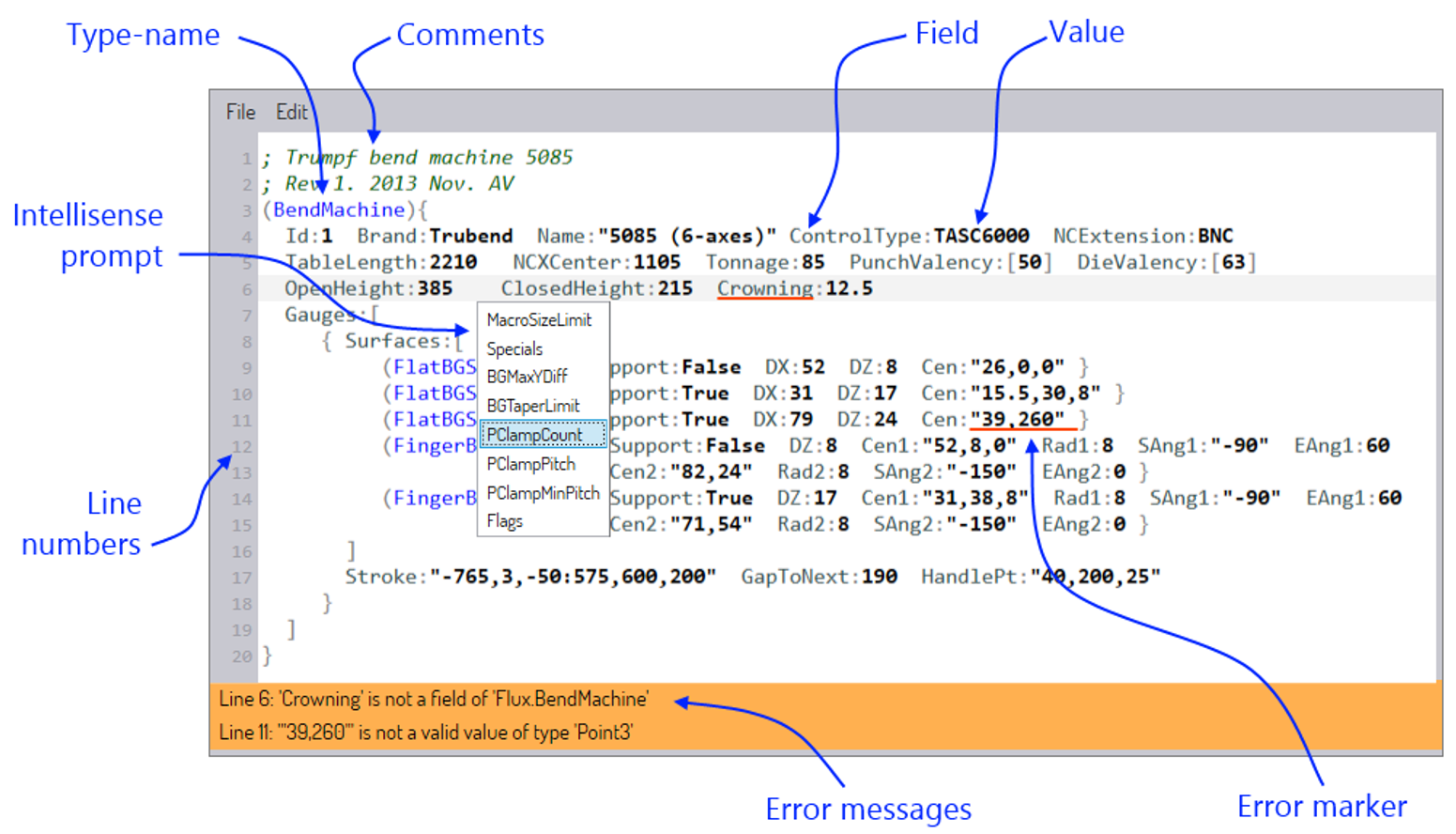
The annotated figure above shows some of the features of the Flux Curl Editor.
-
Different colors and fonts are used for different syntactic elements of the Curl file. Keys are colored in gray, while values are in bold black text. Type names are in blue and comments are in green italics.
-
As you type into the Curl file, intellisense windows pop up to provide useful suggestions. For example, while typing a
BendMachinedefinition, Flux can suggest additional fields or possible type overrides. -
Errors in the Curl file are highlighted with red underlines, and detailed error messages are displayed in the error band at the bottom.
The real-time error checker catches structural problems such as:
-
Using an incorrect field name.
-
Typing a value of the wrong type.
-
Providing a field value twice for the same object.
-
Using an incorrect type of object where polymorphism is permitted.