
Au(Gold) streams
Preamble
The native file format for Flux is known as the Au, or Gold, format. Au files are essentially ZIP files that contain various streams of data. Each stream is typically encoded in the Au stream format and contains a significant chunk of a part. For example, a Drawing2 or a Model3 could be saved in a stream. A full description of the Au file format therefore needs to focus on the encoding found in each Au stream, as well as the actual organization of the container ZIP file.
This document discusses the bit-pattern of bytes inside an Au stream. Fluxnote [TBD] discusses the organization of the container ZIP file.
Au files are binary files designed to be space-efficient and self-describing. The metadata for all types that appear in an Au file are included within the file itself. Because of this, the file format is very tolerant of versioning. Backward compatibility is easy to achieve, and the design also aims for forward compatibility, which is more difficult.
Primitives
.NET types
The following .NET primitive types are saved in Flux files using a bit-pattern similar to that produced by BitConverter, using little-endian byte ordering:
int, uint, short, ushort, long, ulong, byte, sbyte, float, double, char, boolDateTime objects are written out as 64-bit integers using the DateTime.FromBinary and DateTime.ToBinary methods.
Byte arrays (byte[]) are common in Flux and are therefore treated as primitive types. A byte array is written by first writing a count as an IntV, followed by the actual bytes of data. A null byte array is indicated by a byte count of -1.
Strings are also treated as primitive types. A string is first encoded as a byte array using UTF-8 and is then written out in the same way as a byte array: an IntV describing the count in bytes, followed by the actual bytes. A null string is indicated by a byte count of -1.
Guids are treated as primitive types and are written out as a 16-byte array that can be obtained using Guid.ToByteArray().
Variable length integers (IntV)
In many places in an Au file, it is necessary to store small integers, such as string lengths, byte-array lengths, type IDs, and object IDs. These integers are typically small, but Flux does not want to impose arbitrary restrictions such as 16-bit limits. Such integers are therefore represented using a variable-length representation.
An IntV encodes an integer into a sequence of bytes. Each byte holds 7 bits from the integer in the lower 7 bits, and the highest bit is used as a continuation bit. If that bit is set, more bytes follow. The bits from the integer are taken least-significant-byte first.
public unsafe void WriteIntV(int n)
{
    // We first add 1 to the value making it in the range -1..int.MaxValue-1.
    n++;

    for (;;)
    {
        // If the residual value is less than 128, write it out with the
        // MSB set to 0 and exit.
        if (n < 128)
        {
            Write(&n, 1);
            break;
        }

        // Otherwise, write out the lowest 7 bits with the MSB set to 1
        // to indicate that more data follows.
        int m = (n & 127) | 128;
        Write(&m, 1);

        // Shift out the 7 bits we have just written and continue.
        n >>= 7;
    }
}
As can be seen in this code, IntV encoding can store values from -1 to int.MaxValue - 1. The value -1 is supported because it is often used as a marker to indicate no data.
Flux primitives
These Flux types are treated as primitives because they occur very frequently in Flux files. They are read and written atomically since they are all structs whose layout in memory is known. More importantly, these structs should never be changed in the future. For example, a Matrix3 is now effectively locked to always taking up exactly 132 bytes in memory.
Point2, Point2f, Point3, Point3f, Vector2, Vector3, Vector3f, Vector3h,
Bound2, Bound3, Size2, Size3, Matrix2, Matrix3, Matrix3f, Color32
More types may be added to this list in the future.
File layout
An Au file does not have much of an overall layout. First, there is a header that contains these two fields:
uint Signature; // Au file signature, always 0x1A6F2D3D
byte Version;   // Au file metadata version, currently 2
If you create an Au stream as a file, then go to a console window and type that file to display it on the console, you will see the special hidden meaning in this signature, and understand why 1A is the fourth byte.
The signature and version number take up the first 5 bytes.

Following this header, there is exactly one top-level object stored in the Au file. This object could be a complex object such as a part or a nested layout and could contain hundreds or thousands of sub-objects inside. However, at the top, there is exactly one object. If you want to save multiple objects into an Au file, create a container object, put all of them in it, and save the container.
Following this single top-level object, there is a trailer consisting of:
-
The
Epiloguetoken. -
The count of reference objects in the file, written as an
IntV. -
The string
EOF.
This can be used to visually detect truncation. If the file does not end with the text EOF, it is truncated.

Au Tokens
Tokens are single-byte values that act like the keywords of an Au file. They are used to delimit distinct chunks of the file and guide the parsing process.
| Token | Value | Meaning |
|---|---|---|
Null |
1 |
A null pointer or reference. |
NominalType |
2 |
An object follows that is of the nominal or expected type. |
DerivedType |
3 |
An object follows that is of a derived type. |
ObjectRef |
4 |
An object has already appeared in this stream. An integer object ID follows as a cross-reference. |
PrimType |
5 |
A type descriptor for a primitive type follows. |
ClassType |
6 |
A type descriptor for a class type follows. |
StructType |
7 |
A type descriptor for a struct type follows. |
ListType |
8 |
A type descriptor for a list type follows. |
DictType |
9 |
A type descriptor for a dictionary type follows. |
EnumType |
10 |
A type descriptor for an enumeration type follows. |
Epilogue |
11 |
File epilogue follows, including object count and |
Type Descriptor
If there is no large up-front metadata block, where is the metadata saved? It is saved in scattered places throughout the file at the point of first use. The first time a type is referred to in an Au file, its metadata follows immediately.
At various points in an Au file, Flux needs to provide a reference to a type. These are done using type IDs, which are integers starting from 0 and increasing consecutively. These IDs are local to a particular Au file and simply list types in the order in which they are encountered when reading the file.
At any place where a type reference is expected, the reader first reads an integer representing the type ID. If this is the first time that type ID has been seen in the file, it is followed immediately by a type descriptor. Any time you read an IntV representing a type ID, you should therefore be prepared to read the corresponding type descriptor immediately afterwards.
Primitive types
Primitive type descriptors are written as:
-
The
PrimTypetoken. -
The full name of the type, for example
System.Int32.
This is also the case for Flux-defined primitives such as Flux.Point2. It is assumed that the reader already knows what a Flux.Point2 is, so no further definition is required beyond the name.
Enumeration types
Enumeration type descriptors are written as:
-
The
EnumTypetoken. -
The type ID for the underlying type of the enumeration, such as
Int32orUInt64. -
The full name of the type, for example
Flux.ELType.
Class and struct types
Class and struct type descriptors are written as:
-
The
ClassTypeorStructTypetoken. -
The full name of the type, for example
Flux.E3Plane. -
The version number of the type, as an
IntV. -
The base type ID, or
-1for no base type, also as anIntV. -
The field count for serialized fields, as an
IntV. -
For each field:
-
Field name.
-
Alternative field name, meaning a human-readable name.
-
The type ID for the field’s type, written as an
IntV.
-
This descriptor is recursive. To specify the base type or a field type, Flux writes another type ID. That referenced type may itself be new, in which case its full descriptor is inserted immediately at that point.
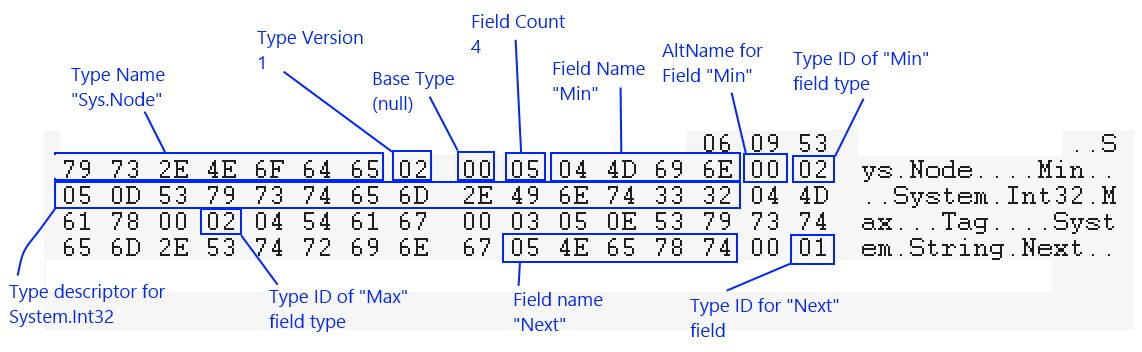
Suppose we have a simple type like this:
namespace Sys
{
    public class Node
    {
        public int Min;
        public int Max;
        public string Tag;
        public Node Next;
    }
}
When trying to understand the type descriptor diagram for this class, it helps to remember that many fields are stored as IntV, and IntV encoding represents a small number N as N + 1 in the file. So, for example, a field count of 4 is encoded as 05.
The first time the System.Int32 type ID appears, as the type for the Min field, it is followed by the full type descriptor. The next time it appears, as the type for the Max field, only the type ID is emitted because the type has already been seen. In this example, types with IDs 0 (Sys.Node), 1 (System.Int32), and 2 (System.String) are introduced.
Code that parses type descriptors must therefore be recursive and must be prepared to encounter a fresh new type descriptor even before the current one is fully parsed. Code that parses objects in an Au file must have the same flexibility.
Type descriptors for classes and structs can sometimes be written out partially. In that case, the name and base type are written out but the field list is not. This is indicated by a field count of -1. Such a type is only partially specified, and objects of that type cannot yet be serialized or deserialized. Before the first object of that type is written, the field list is then written out. This optimization avoids storing metadata for objects that are never actually written.
List types
Au files treat lists, meaning one-dimensional vectors, as special types. The internal runtime type used to implement the list is ignored. It could be an Array, a List, an AList, or any other type implementing IList. Lists are stored in a normalized form so that changes in implementation type do not affect the file format.
List type descriptors are written as:
-
The
ListTypetoken. -
The type ID of the element type, written as an
IntV.
As always, if that type ID is encountered for the first time, the corresponding type descriptor follows immediately.
Dict types
Au files treat dictionaries, meaning associative arrays, specially as well. As with lists, the actual internal type used in memory is ignored and the dictionary is stored in a unified on-disk form.
Dictionary type descriptors are written as:
-
The
DictTypetoken. -
The type ID of the key element type, written as an
IntV. -
The type ID of the value element type, written as an
IntV.
Object layout
Nominal type
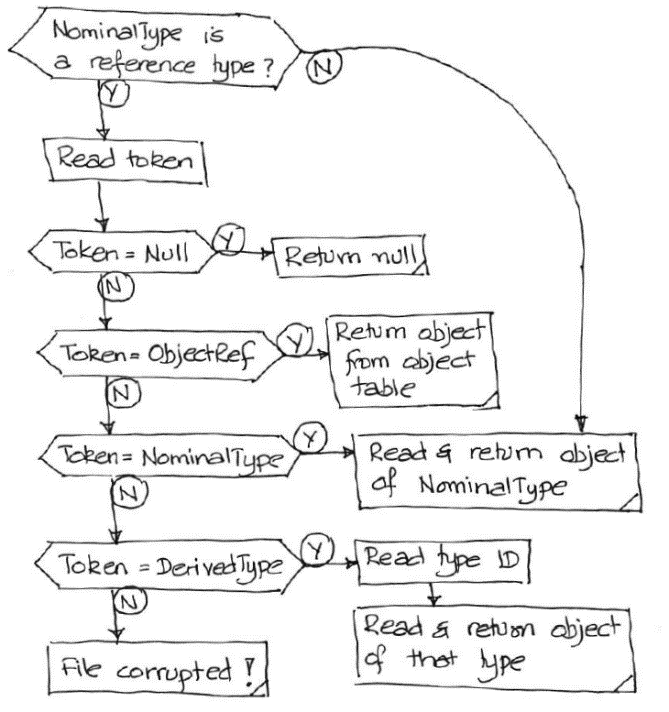
Now that the type descriptor format is clear, object layout becomes easier to understand. An important concept is the nominal type. At every point in a file where an object is read, there is an expectation of what the type of that object should be. For example, if Flux is reading a list of integers, the expected type for each element is int.
The actual layout of an object depends strongly on whether it must be of the nominal type or could be of some derived type. When reading elements of a List<int>, no variation is possible. Every element must be of type int. But when reading a List<Entity2> while loading a drawing, each element may be one of several derived types of Entity2.
In situations where the actual type may differ from the nominal type, the stream begins with one of two tokens:
-
NominalType, if the object that follows is exactly of the nominal type. -
DerivedType, if the object that follows is of a derived type.
In the DerivedType case, the token is followed immediately by the type ID of the actual type, and then by the object data itself.
When the nominal type cannot possibly vary, such as when reading a List<Point2>, neither NominalType nor DerivedType is written. The object data follows immediately.
A special case occurs at the start of an Au file. At that point there is no real nominal type, so reading starts by assuming a nominal type of System.Object. Since the top-level object in an Au file is never actually System.Object, the first token after the header is invariably DerivedType, followed by the type ID and type descriptor of the first object.
Nulls and cross-references
When an object is expected to be read, there are two important special cases.
If the object is null, the stream contains only the Null token.
If the object has already appeared earlier in the file, which is common with cross-linked Flux data, the stream does not repeat the object data. Instead it writes an ObjectRef token followed by the object ID of the existing object, written as an IntV.
Object IDs are assigned in the order in which objects appear in the file. The first object has object ID 0. Subsequent IDs are assigned only to reference types. Value types such as structs and primitives are never assigned object IDs. Lists and dictionaries count as reference types here because they can be cross-referenced.
The object IDs are not explicitly written in the file; they are implied by object order. It is therefore essential that a reader track object IDs in perfect sync with the writer. The object count stored in the epilogue can help detect a synchronization error.
Actual object data
Once the stream is past the Null, ObjectRef, NominalType, and DerivedType handling, the actual object data is straightforward.
Classes and structs: All fields are written in metadata order. If some of those fields are reference types, the full object-layout logic above applies recursively.
Lists:
An IntV element count is written first, followed by the actual elements.
Dictionaries:
An IntV element count is written first, followed by each key-value pair.
Primitives:
Primitive types know how to encode themselves into bytes. For standard primitives such as Int32 and Int16, helper methods in ByteStm are used. For other primitives such as Point2 and Matrix3, the serializer expects static FromBytes and ToBytes methods.
Enumerations:
Enum types whose underlying type can be converted to Int32 without truncation, such as int, short, ushort, byte, and sbyte, are serialized as IntV values. Other enums are serialized by casting to their underlying type. For example, an enum backed by int uses variable-length IntV storage, while an enum backed by ulong always takes exactly 8 bytes.