
FluxCode
Welcome to the Metamation Technical Notes. https://trumpf.atlassian.net/wiki/spaces/TZB/pages/1836253265/Flux+Onboarding+Handbook
Code structure of Flux
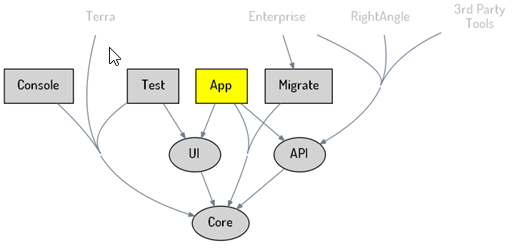
The picture below shows the major components of Flux and their dependencies.
-
Ellipses are Flux DLLs, with names such as Flux.Core.dll and Flux.UI.dll.
-
Rectangles are Flux executables, with names such as Flux.Test.exe and Flux.exe.
-
Flux.exe is the final Flux executable that end-users run.
-
Other nodes in the graph are components above and below Flux.
The sections below give a brief explanation of each component.
Core
This is essentially the Flux engine. It contains everything in Flux except the user interface used to manipulate Flux objects with keyboard and mouse.
If we use a Model-View-Controller lens, Flux.Core contains both models and views. It includes model classes such as E3Plane, E2Spline, and LaserCut, and corresponding view-model classes such as E3PlaneVM, E2SplineVM, and LaserCutVM.
These view-model classes know how to render through OpenGL. Rendering goes through a small set of entry points, so swapping render backends in the future is still feasible.
Earlier architecture kept VM classes outside Core. That separation proved difficult because Flux is not a typical business application with loosely coupled models and presentation. Flux objects are CAD/CAM objects that are tightly coupled to visual representation.
For example, even a basic operation like generating NC code requires rendering 2D or 3D views of the part/model for inclusion in output. Rendering bend setup sheets, clearly a Core operation, can require thumbnails or 3D-PDF data.
With strict Core/UI separation, even a call like BendTech.GenerateCode became complex. Core had to use artificial, type-unsafe bridging patterns, such as the Hub whiteboard, to access upstream capabilities. Core could not even save a Flux-native FX file cleanly, because thumbnail rendering lived in higher layers.
So while modularity is valuable, Flux moved toward a more integrated architecture after practical experience.
Core module map
-
Layout: layout and nesting related code and NC post generators.
-
Layout/Post: NC code generators for different machines.
-
Part: part objects.
-
Model: geometric model representation and operations.
-
Trim: 3D/E2 geometry and trimming/formation.
-
CAM: CAM process, tooling, and cut sequencing.
-
Laser: laser-specific processing and operations.
-
Bend: press-brake bending logic and tooling.
-
Fold: folding features and machine-specific fold tooling.
-
BCell: robotic/cell automation helpers such as grippers, pickup/placement, and Unloader integration.
-
Nest: nesting algorithms and job handling such as NestJob, NestJobFiller, OnePartNest, and pixel/outline helpers.
-
Punch: punching operations and helpers.
-
IO: import/export for formats such as DXF, IGS, STL, Geo, MetaCAM, and BTD.
-
Sim: simulation helpers and kinematics, including mechanism and IK solver.
-
Report: reporting and picture helpers.
-
Settings: configuration, sheaf definitions, and layout settings.
-
OEM: OEM-specific initialization by machine vendor, such as Delem, Fanuc, Plb, and Touchpoint.
-
WPF: small helpers used by the WPF application.
UI
Continuing the MVC paradigm, this layer contains controllers for Flux objects. It includes classes such as E3PlaneGlob, E2SplineGlob, and LaserCutGlob, all derived from Glob, that implement operations available on those objects.
Globs expose editable properties and executable operations. The Glob system also supports composite globs for multi-selection scenarios.
Glob properties and operations are represented as GElement-derived objects, then translated into concrete UI by classes such as PanelMaker, which convert abstract GElements into WPF controls. This abstraction also makes alternate UI renderers possible, such as HTML-based renderers.
Beyond the Glob hierarchy, this layer also contains many WPF dialogs and windows, such as TurretEditor, SheafEditor, and LaserDBEditor.
App
Flux.App is a thin layer implementing the main window for Flux. It manages global UI concerns such as selection state, Glob panel creation, and undo state management.
It also maintains multiple Flux documents and a tabbed editor for switching between them. Flux.App is relatively small compared with Flux.Core and Flux.UI.
In a typical end-user installation, Flux.exe is the only visible code-bearing file. Flux.Core.dll and Flux.UI.dll are bundled as resources inside Flux.exe.
API
This DLL is a thin wrapper around Core that provides controlled access to Flux classes. For many classes, this layer exposes wrapper types that provide a subset of functionality.
Third-party tooling, including automation integrations, should be built on this layer. When Flux.API.dll is shipped to third parties, dependencies such as Core are bundled and not exposed for direct use.
Migrate
Flux.Migrate is a command-line application used to migrate configuration information from MetaCAM and other legacy systems, notably TOPS.
It provides commands such as converting a bend-tool library from TOPS format to Flux format, or importing a punch-machine definition from MetaCAM.
This tool is intended for system integrators and Metamation support staff, not end-users.
Console
Flux.Console is a developer-facing command-line application. It supports system-level operations such as rebuilding Flux metadata and other internal utilities.
This tool is for use within Metamation.
Test
Flux.Test.exe contains Flux test suites and acts as a console-mode test runner.
There is also a GUI-based test runner that provides test coverage functionality.