
Metamation Developer Notes

  • Developer Notes
  • Resource Map
  • Tools
    • Code Formatting
    • Configuring Git
    • Assignments
    • Testing with Windows Sandbox
    • Single Binary Applications
    • Self-Updating Applications
  • Flux Workflow
    • Flux Workflow
    • Flux Development Style Guide
    • Release notes for Flux
    • SonarCloud analysis for Flux
    • Build a Flux SDK Program
    • Shipping Flux
    • Flux.Test
      • BasicBendAuto Test
      • LaserAuto.cs Detailed Documentation
      • Laserexample:Test1
  • Technical Notes
    • File formats
      • .FX File Format
      • Au(Gold) streams
      • .GEO File Format
      • .LST File Format
      • .LST file - technology
      • .BNC File Format
      • .WAD Files: Flux Resource Packages
      • .Curl Files: ASCII config information
    • Folders App
      • Data\Bendtools
      • Data\Machines
    • FluxCode
      • Welcome & Repo Map
      • Architecture & System Context
      • Subsystem *Bend* (Press Brake)
      • Subsystem *BCell* (Bend Cell Automation)
      • API Maps
      • Data Model Catalog
      • Design Patterns -- A Reader's Guide
      • Tests and Golden Paths
      • Guided Code Tours
      • CAM Glossary with Code Mapping
      • Assignments
      • Flux Onboarding Handbook
    • Data flow
      • Part
        • Part.Dwg
        • Part.Load
        • Part.Load to Part.Dwg
      • BendTech.cs
      • Bend Technology
      • Laser Cutting Technology
    • Machine ID Scheme
  • FluxTester
    • LaserTooling.cs Test Steps
    • Fluxtester Recipe Book
    • Nesting.cs Overview
    • Nesting.cs Recipe Book
    • Job.cs Overview
    • Job.cs Recipe Book
  • 3d party software
    • Python
  • Documentation
    • Bento tool
      • Structure
      • Attributes
    • Software
      • Software Requirement
      • Installation
      • Git Workflow
      • Environment Variable
      • Tools
    • Workflow
      • Roles
      • Analyze
      • Edit
      • Proofread
      • Pre-Publish
      • Publish
      • Release cycle
      • Information required for Documentation Team
      • Checklist for Documenters
    • Styleguide
    • Flavoring
    • Translation
      • General process
      • Anchor points
      • BT Diff Generation
      • BT Translate
      • BT Apply Changes
      • Order at Seprotec
    • Citations
Documentation
/
Software
/
Tools

Tools

Every content developer should strive to have the best structured documentation.

Restructuring files, folders and images in Bento documentation is a little tricky. Here are some script tools to restructure. They are not self explanatory and mostly based on matlab scripts.

Wolf Wadehn will help to restructure the Table of Contents.

Convert Word to Bento (Word2Bento.m)

A script that cleans up a via Pandoc-generated adoc file for use in Bento.

C:\Users\wadehnwo\AppData\Local\Pandoc\pandoc Vulcan.docx -f docx -t asciidoc --wrap=none --markdown-headings=atx --extract-media=extracted-media -o output.adoc

Convert Filestruc to Btxt (Bentofilestruc2txt.m)

A script which converts a Bento file structure into a text file like:

.\contents.txt
  .\index.adoc
  .\fds.adoc
  .\8_Windowssystemcontrol\contents.txt
  .\8_Windowssystemcontrol\index.adoc

Convert Btxt to Mindmap (Btxt2MM.m)

A script which converts the Btext file into a mind map for graphical rearrangement. Use Freemind.com.
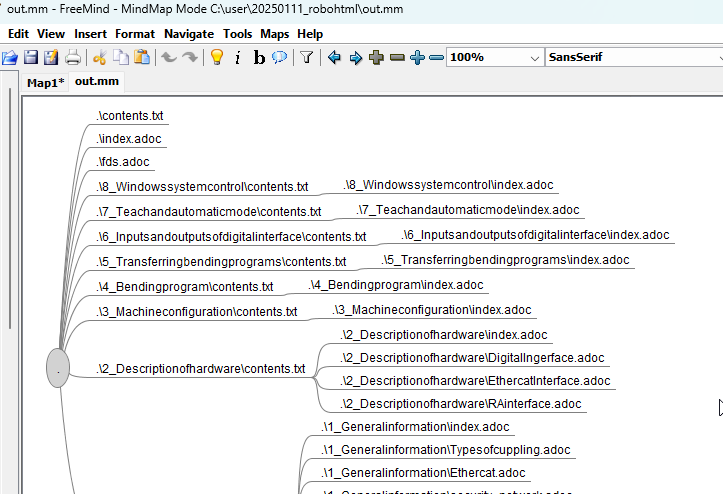
MM

Convert Mindmap to Btxt (MM2Btxt.m)

A script which converts the Btext again out of MM.

Convert Btxt to a new Bento project (MM2Btxt.m)

Creates a new file structure in the subfolder "new" and sorts all pics in the right directories.

Contents

  • Convert Word to Bento (Word2Bento.m)
  • Convert Filestruc to Btxt (Bentofilestruc2txt.m)
  • Convert Btxt to Mindmap (Btxt2MM.m)
  • Convert Mindmap to Btxt (MM2Btxt.m)
  • Convert Btxt to a new Bento project (MM2Btxt.m)
Environment Variable Workflow

      Copyright © 2025 TRUMPF Metamation. All rights reserved.

    Compiled by Bento